General Ledger Analysis: 40+ Financial Reports in Minutes
Turn any general ledger export into 40+ financial reports in minutes -- ratio analysis, trend detection, cash flow forecasting, and anomaly detection. The GL data already exists. LedgerIQ extracts the intelligence from it.

Quick answer
LedgerIQ turns a general ledger export from any accounting platform into more than 40 financial analysis modules in minutes, including trial balance, profit and loss, balance sheet, cash flow, ratio analysis, DuPont decomposition, seasonality, revenue forecasting and anomaly detection. It works from transaction-level GL data rather than a trial balance, which is what makes trend and anomaly analysis possible. All 44 modules run entirely in the browser, so no financial data leaves the device, and the RiQ AI copilot explains any metric, navigates by command and generates board-ready PDF reports.
- LedgerIQ builds 44 analysis modules from a single GL export from any accounting platform.
- Analysis runs entirely client-side in the browser; transaction data is never sent to a server.
- Transaction-level GL data, not a trial balance, is what enables trends, seasonality and anomaly detection.
Every accounting platform records transactions faithfully. Very few do anything useful with the data once it is recorded. The general ledger contains the raw material for genuine financial intelligence -- ratio analysis, seasonal patterns, cash flow timing, margin trends, anomaly detection -- but until now, a financial analysis tool capable of extracting it required enterprise budgets or a finance team with spare afternoons.
LedgerIQ is GL analysis software built to close that gap. Upload a general ledger export from any platform, and this financial analysis tool produces 44 modules entirely in the browser. No data leaves the device. No server-side processing. No implementation project.
Most small businesses have accounting software that records transactions. Far fewer have a financial analysis tool that actually analyses them. The typical workflow is: bookkeeper keeps the books, accountant produces year-end accounts, business owner gets a tax bill and a P&L they half-understand.
The irony is that the data for genuine financial intelligence already exists -- sitting in the general ledger of whatever accounting platform the business uses. Every transaction, every account code, every date. The raw material for ratio analysis, trend identification, anomaly detection, cash flow forecasting, and margin analysis is already there. As the ICAEW's financial management guidance makes clear, the challenge has never been a lack of data -- it has been the gap between raw transaction records and actionable insight. It just needs GL analysis software capable of reading it properly.
That is what LedgerIQ does. You export the general ledger from Xero, QuickBooks, Sage, Pandle, or any other platform as a CSV or Excel file. LedgerIQ reads it, classifies the accounts, and produces 40+ financial analysis modules -- from standard ratio analysis to seasonal pattern detection to DuPont decomposition -- in a matter of minutes.
Why the general ledger matters
A trial balance is not enough
A trial balance gives you account totals. It tells you that "Sales" was £340,000 and "Rent" was £24,000. You can calculate a few ratios from those totals, but you cannot see trends, seasonality, anomalies, or month-by-month movement. The AccountingWeb practice community regularly discusses this limitation when comparing analysis tools.
Claiming CFO-grade analysis from a trial balance is like claiming a medical diagnosis from a patient's weight. You need the detail underneath.
The general ledger contains every individual transaction posted to every account. That transaction-level detail is what makes real analysis possible:
- Monthly and quarterly trends -- see how revenue, expenses, and margins move over time, not just what they total to
- Seasonal patterns -- identify which months are strong and which are weak, with statistical significance
- Anomaly detection -- spot unusual transactions or expense spikes that would be invisible in a trial balance
- Cash flow timing -- understand when money actually moves, not just how much moved in total
- Working capital dynamics -- calculate debtor days, creditor days, and cash conversion cycles from actual posting dates
How LedgerIQ works
Export your general ledger
From Xero, QuickBooks, Sage, Pandle, FreeAgent, or any platform that exports to CSV or Excel. LedgerIQ works with any chart of accounts structure -- you are not locked to a specific platform.
Upload and map columns
Drag and drop the file. LedgerIQ auto-detects date, account, description, and amount columns. For most standard exports, the mapping is automatic. You can adjust if needed.
Account classification (Universal Enrichment)
LedgerIQ's enrichment engine automatically classifies each account in your chart of accounts into financial statement categories -- revenue, cost of sales, operating expenses, fixed assets, current assets, liabilities, equity. This powers the financial statements and ratio calculations. You can correct any misclassifications with a click.
Analysis dashboard loads
All 44 modules populate simultaneously. Navigate between them using the sidebar. Every chart, table, and ratio is interactive -- hover for detail, click to drill down, export any view to PDF or Excel.
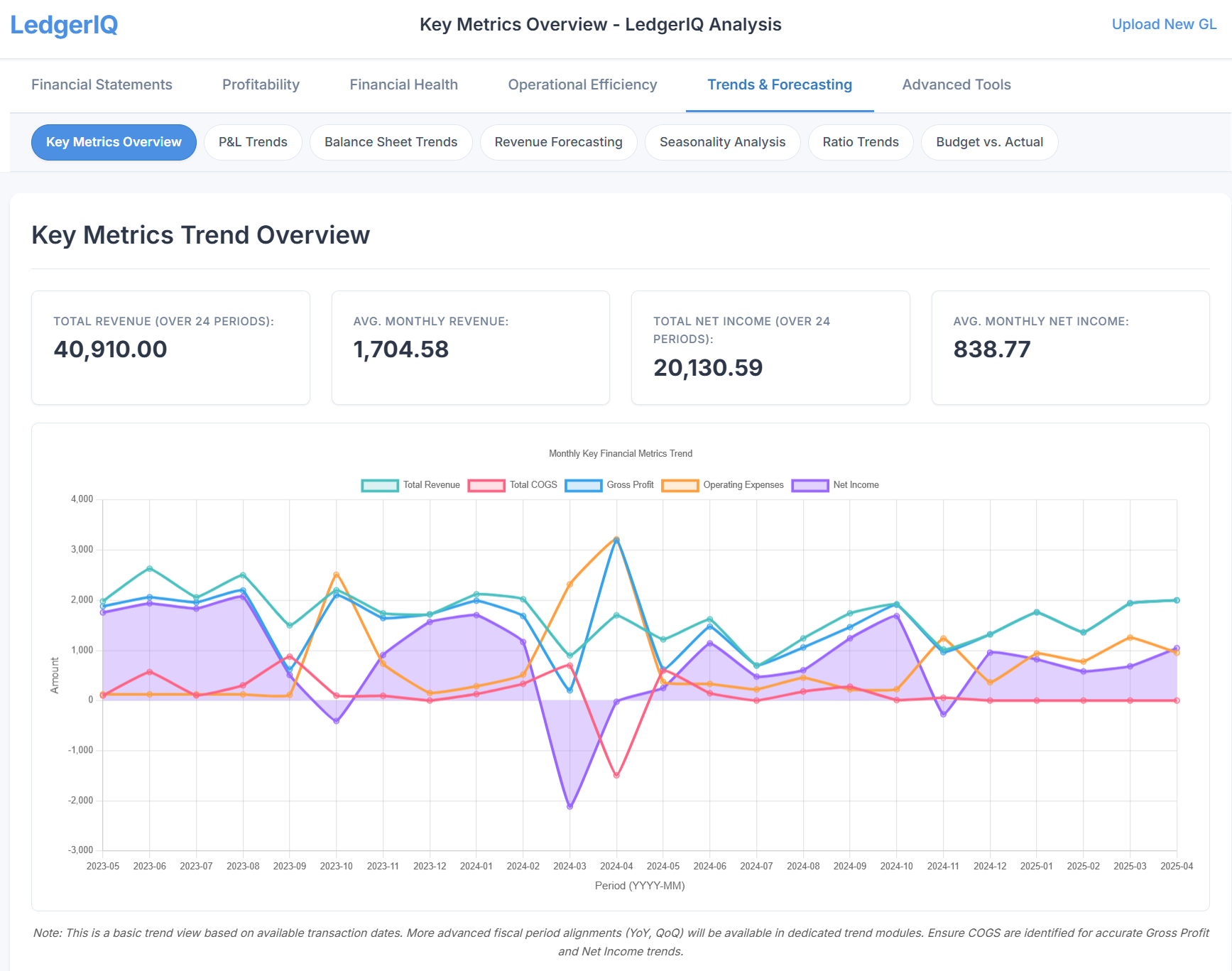
40+ GL analysis modules included
LedgerIQ is not a single report. It is a complete GL analysis software suite where each module examines your data from a different angle. Here is what is included in this financial analysis tool.
Core financial statements
These are the foundation. LedgerIQ generates them automatically from the GL data, classified by the enrichment engine. If you have never had proper management accounts generated this quickly, this alone justifies the upload.
Trial Balance
- Opening and closing balances
- Period movement by account
- Drill-down to transactions
Profit & Loss
- Revenue, COGS, gross profit
- Operating expenses by category
- Net profit with margin %
Balance Sheet
- Assets, liabilities, equity
- Current vs non-current split
- Net assets and working capital
Cash Flow Statement
- Operating, investing, financing
- Indirect method from GL data
- Free cash flow calculation
Ratio analysis and efficiency
Each ratio module calculates the metric, shows the trend over time, and explains what the number means in plain language. Benchmarks are provided where industry data is available.
| Module | What it covers |
|---|---|
| Liquidity Ratios | Current ratio, quick ratio, cash ratio -- can the business pay its short-term obligations? |
| Debt & Leverage | Debt-to-equity, debt-to-assets, interest cover -- how reliant is the business on borrowed money? |
| Return Ratios | ROA, ROE, ROCE -- how efficiently is capital being used to generate profit? |
| Working Capital | Net working capital, working capital ratio, trends over time |
| Cash Conversion Cycle | Days inventory + days receivable - days payable = how long cash is tied up |
| Receivables & Payables | Debtor days, creditor days, turnover rates -- payment behaviour analysis |
| DuPont Analysis | ROE decomposed into margin, turnover, and leverage components |
Profitability and revenue deep dives
Margin Analysis
- Gross, operating, net margins
- Trend visualisation
- Margin decomposition
Revenue Insights
- Revenue by source/account
- Growth rate calculation
- Concentration risk flagging
Expense Structure
- Fixed vs variable breakdown
- Cost category analysis
- Period-over-period change
Expense Correlation
- Which expenses move with revenue?
- Statistical correlation scores
- Cost behaviour classification
Forecasting, scenarios, and advanced analysis
Revenue Forecasting
- Trend-based projections
- Seasonal adjustment
- Confidence intervals
Break-Even / CVP
- Break-even revenue point
- Margin of safety
- What-if scenario modelling
Seasonality Analysis
- Monthly/quarterly patterns
- Statistical significance test
- Peak vs trough identification
Anomaly Detection
- Statistical outlier identification
- Unusual account movements
- Flagged for review
Also included
Common-size P&L and Balance Sheet (percentage analysis), Statement of Changes in Equity, Capital Structure Optimisation, Credit Risk & Lending Analysis, Tax Efficiency Analysis, Financial Health Scoring, Asset Management, Budget vs Actual (when budget data is available), Productivity Metrics, and Ratio Trends with multiple visualisation options.
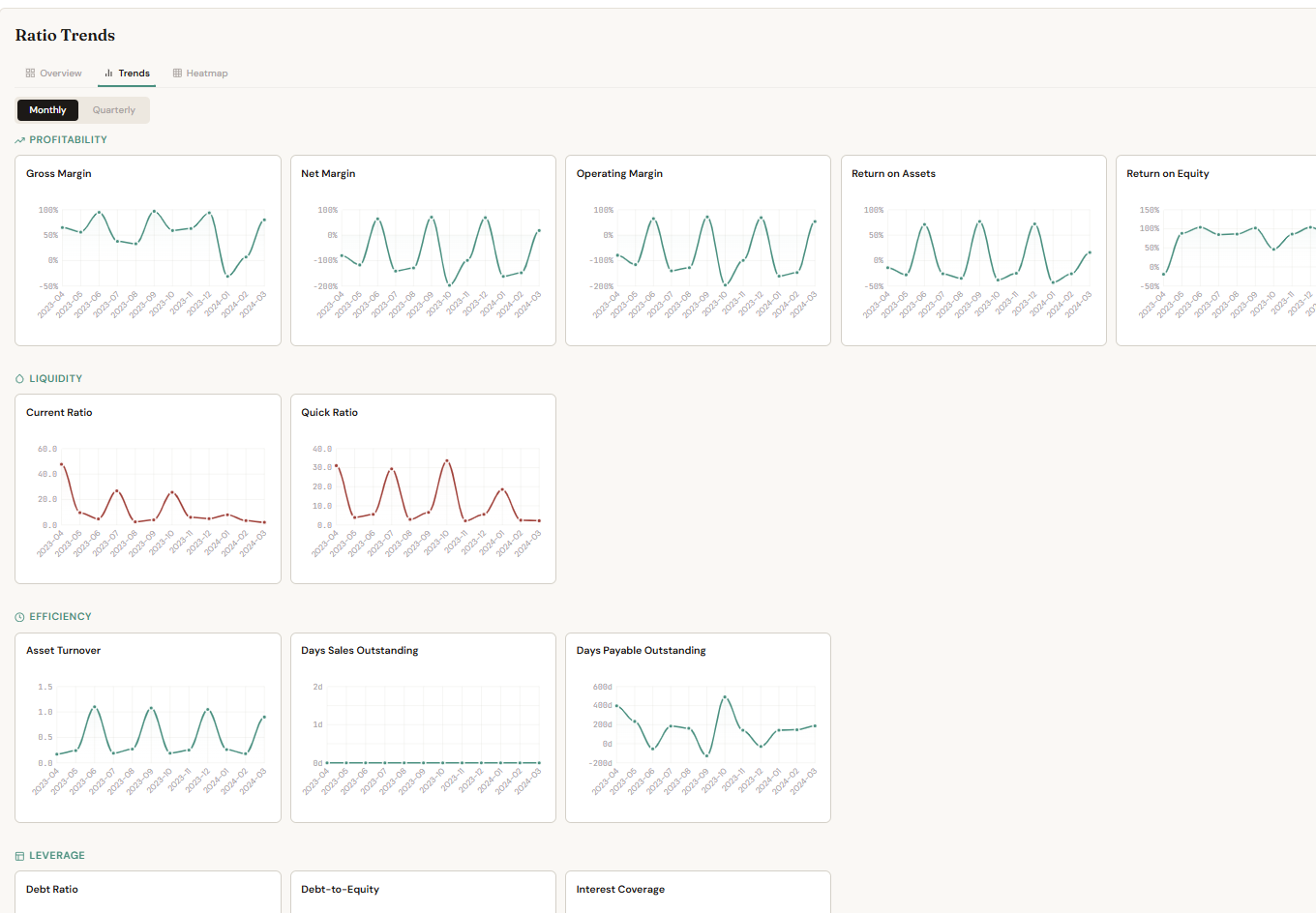
RiQ: your AI analysis copilot
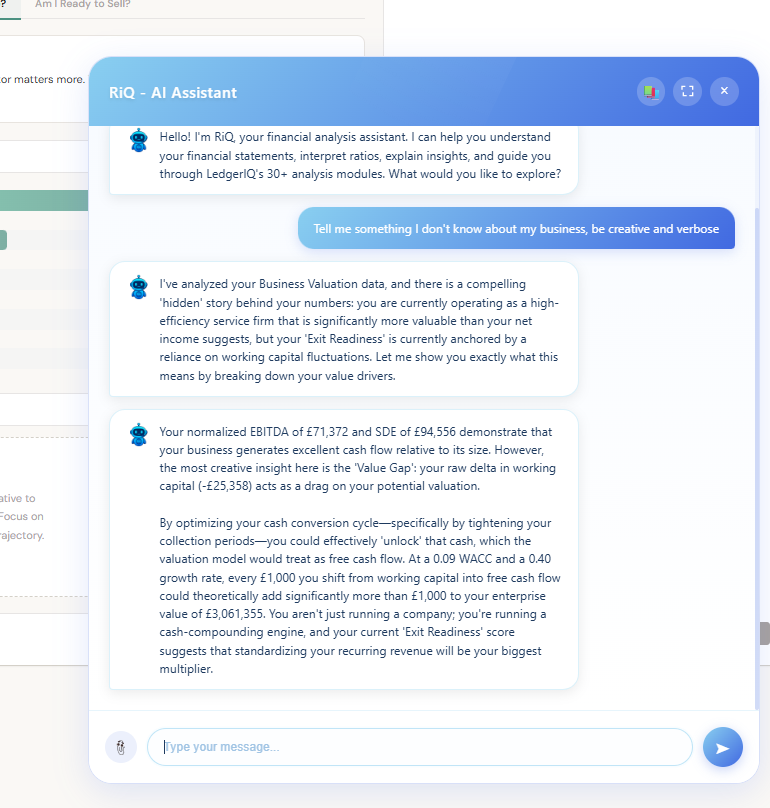
Every module in LedgerIQ comes with RiQ -- an AI companion that can explain what you are looking at, answer questions about the numbers, and generate narrative reports.
Explain any metric
Click the explain button on any ratio, chart, or table. RiQ provides a plain-language explanation of what the number means, why it matters, and what action to consider. Useful when presenting to business owners who are not accountants.
Navigate by command
Type natural-language requests: "show me the liquidity ratios", "switch to the cash flow statement", "filter to Q4 2026". RiQ executes the navigation for you, saving clicks through 44 modules.
Generate board-ready reports
RiQ can produce narrative financial summaries that combine the key findings across modules into a single written report. Export as PDF for client meetings, board packs, or lending applications.
Client-side processing and data privacy
Your data never leaves your browser
LedgerIQ processes everything client-side. The GL data you upload is parsed, classified, and analysed entirely within your browser using JavaScript. No transaction data is sent to any server. No GL data is stored in any database. When you close the tab, the data is gone.
This is a deliberate architectural choice. Accountants handle sensitive client financial data. The simplest way to guarantee confidentiality is to never transmit the data in the first place.
The only server communication is for the RiQ AI copilot (which sends aggregated summaries, not raw transaction data) and for user authentication. The financial analysis itself -- every ratio, every chart, every forecast -- runs locally.
Who uses LedgerIQ
Accountants producing management accounts
Upload a client's GL export after month-end close process bookkeeping. In minutes, you have a full suite of management accounts, ratio analysis, and trend data -- ready for a client advisory meeting. What used to take hours of spreadsheet work becomes a standard part of your monthly process. This capability is transforming how practices approach scaling their practice with advisory services.
Bookkeepers adding advisory value
You already have access to the general ledger. LedgerIQ lets you offer financial analysis alongside your bookkeeping service without needing to build spreadsheet models. The analysis is automated; your value is in the interpretation and advice.
Business owners who want to understand their numbers
If you can export a CSV from your accounting software, you can use LedgerIQ. The RiQ copilot explains every metric in plain language, and the visual dashboard makes financial data accessible without an accounting degree. For many SMEs, this represents their first experience with one-click financial analysis that would traditionally require hiring a financial analyst.
Anyone preparing lending applications or board packs
Banks and investors want ratio analysis, cash flow projections, and trend data. LedgerIQ generates all of this from a single GL upload, with PDF exports formatted for professional presentation.
Getting started
Exporting your general ledger
In Xero: Reports > General Ledger > Export to Excel. In QuickBooks: Reports > General Ledger > Export. In Sage: Reporting > General Ledger > Export to CSV. In Pandle: Reports > General Ledger > Download CSV.
The export should include date, account name or code, description, and debit/credit amounts (or a single net amount). Most standard GL exports include these columns by default.
LedgerIQ is part of The IQ Suite, alongside ReconcileIQ (bank statement reconciliation) and CodeIQ (automated transaction coding and posting). They work together -- reconcile and code your transactions with ReconcileIQ and CodeIQ, then analyse the resulting ledger with LedgerIQ -- but each tool works independently.
Try LedgerIQ with your own data
Upload a GL export and see what 44 analysis modules reveal about your business. Client-side processing means your data stays private.
Open LedgerIQFrequently Asked Questions
What is LedgerIQ?
LedgerIQ is a client-side financial analysis platform that accepts general ledger exports from any accounting software and produces 44 analysis modules including profit and loss, balance sheet, ratio analysis, cash flow forecasting, and anomaly detection.
Is my data safe with LedgerIQ?
Yes. LedgerIQ processes all data entirely in your browser. No financial data is uploaded to any server. Your general ledger information never leaves your device, providing complete data privacy.
What accounting software does LedgerIQ work with?
LedgerIQ works with any accounting software that can export a general ledger in CSV or Excel format. This includes Xero, QuickBooks, Sage, FreeAgent, Pandle, and any other platform with GL export capability.
What kind of analysis does LedgerIQ produce?
LedgerIQ generates financial statements (P&L, balance sheet, cash flow), ratio analysis (liquidity, profitability, efficiency, return ratios), trend analysis, revenue forecasting, anomaly detection, break-even analysis, DuPont decomposition, and board-ready PDF reports.