IQ Books Mobile: Free Receipt Capture, Mileage and Voice Invoicing on Your Phone
The whole of IQ Books, in your pocket. Snap receipts that file themselves, log HMRC mileage with one tap, review bank transactions that arrive already coded, and raise an invoice by talking to your phone. Coming soon to the App Store and Google Play.
Quick answer
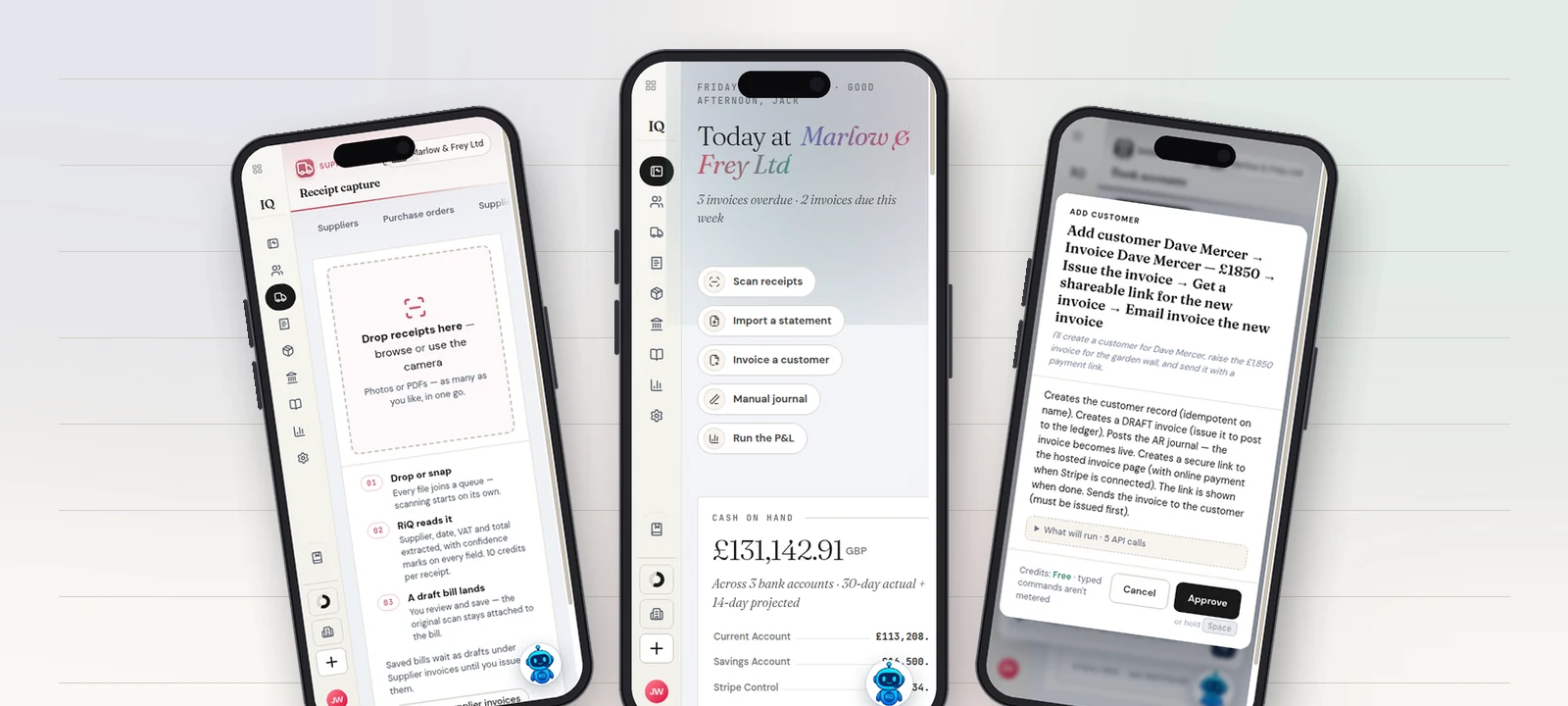
IQ Books Mobile is the phone app for IQ Books, the UK bookkeeping platform from The IQ Suite. It gives small businesses free receipt capture (photograph a receipt and a draft bill is created from it, with the scan attached), one-tap GPS mileage logging at HMRC approved rates with the 55p to 25p step handled automatically, on-the-go invoicing including by voice through RiQ, and a review inbox where bank transactions arrive already coded by CodeIQ's eight-phase pipeline. The app is finished and in release testing, coming soon to the App Store and Google Play; the full IQ Books web app already works in any phone browser today.
- Photographed receipts queue offline and become draft bills with the scan attached; photographing and queueing is free.
- One tap starts a GPS mileage log at HMRC approved rates, stepping from 55p to 25p at 10,000 miles automatically.
- RiQ raises, issues and emails an invoice with a payment link from one spoken sentence, after your approval.
Bookkeeping software has always assumed you are sitting down. The ledger lives on a screen at a desk, and everything that happens away from the desk, which for a tradesperson, a landlord or a freelancer is most of the working day, gets scribbled down, stuffed in a glovebox or simply forgotten until month end.
IQ Books Mobile is built on the opposite assumption: the useful moment is the moment it happens. The receipt exists in your hand at the builders' merchant. The journey happens while you drive it. The price is agreed while you are standing in the customer's garden. The app's job is to catch each of those moments in a few seconds, feed them into the same double-entry ledger that IQ Books keeps for you, and then get out of your way.
Free receipt capture that files itself
Every bookkeeping app has a camera button. The difference is what happens after the shutter. In IQ Books Mobile, a photographed receipt joins a queue on the device itself, which means it works in a basement, a van or a site cabin with no signal, and uploads when the connection comes back. You can capture up to twenty in one go, share a receipt straight into the app from your phone's share sheet, or forward the PDF a supplier emailed you.
Then RiQ reads it. Supplier, date, VAT and total are extracted and assembled into a draft bill, with a confidence mark against every field so you can see exactly what the AI was sure about and what deserves a glance. The original photo stays attached to the bill, which is precisely what HMRC wants from digital records. You review, save, done. No typing, no shoebox, no "receipts weekend" in January.

The honest pricing note: photographing and queueing receipts is free on every tier, including the free one. The AI extraction costs 10 credits per receipt, which on the £5 a month Starter plan works out at 500 scanned receipts a month, more than most small businesses see in a quarter.

Mileage that logs itself while you drive
HMRC's approved mileage rates are more generous than ever, 55p a mile for the first 10,000 business miles from April 2026 (the first rise since 2011) and 25p after that, and mostly unclaimed, because claiming them means remembering every journey. A notebook in the door pocket is not a system.
In the app, one tap starts a journey. GPS traces the route in the background, and the trip carries on recording even if you switch apps or the screen locks. When you arrive, the app turns distance into money at the correct rate and drafts the expense claim. It tracks your year-to-date mileage, so when you cross the 10,000-mile threshold mid-year the rate steps from 55p to 25p on its own, which is the detail that quietly goes wrong in most spreadsheets. Journeys you drive often can be saved and re-logged with a tap.
What that is worth
A tradesperson driving 8,000 business miles a year is sitting on £4,400 of allowable mileage at the new 55p rate. Most claim a fraction of it because the log does not exist. A one-tap logger that catches every journey does not change the rate; it changes how much of it you actually claim.

The sixty-second invoice: speak it, send it, get paid
Here is the scenario the app was really built for. A builder finishes walking a job with a customer, and they agree £1,850 for the garden wall, there and then, in the garden. In the old world, that agreement waits until the evening, or the weekend, or whenever the laptop next opens, and every day it waits is a day closer to being haggled, forgotten or "can you just knock a bit off".
In IQ Books Mobile, the builder holds the mic button and says: "Raise an invoice for Dave Mercer for £1,850 for the garden wall and email it with a payment link."


RiQ does not just fire off actions. It shows its working: a confirmation card listing every step it is about to take, in plain English, with the exact amount. The builder taps Approve. The customer record is created, the invoice is raised and issued into the ledger, and an email lands in Dave's inbox with a secure link to a hosted invoice page where he can pay by card on the spot.
And here is the part that saves the evening admin as well as the morning's: when Dave pays, the payment is recorded against that invoice automatically. Money in the bank, invoice marked paid, payment allocated, and a push notification on the builder's phone to say so, often before the van has left the street. There is no "must remember to mark that one as paid" pile, because the reconciliation happened the moment the card was charged.
If you would rather not talk to your phone in front of a customer, the same instruction typed into RiQ's chat is free, and the classic way (a form with a customer picker, line items and VAT handled for you) is two taps from the home screen. You can even show a QR code and take payment in person.

Bookkeeping that does itself while you are out
The receipts, the miles and the invoices all feed the same ledger, and the ledger largely runs itself. Bank transactions arrive in a review inbox already coded: IQ Books applies your bank rules and history, and a tap on the CodeIQ card runs the full eight-phase coding pipeline over whatever is waiting, so a week of trading becomes a thirty-second review at the bus stop. Each suggestion carries its confidence and the method that produced it, you confirm the lot with one tap, and drafts that match an outstanding invoice are recorded as invoice payments rather than loose income, so the books stay reconciled rather than merely tidy.


Around that core there is more than you would expect from a companion app, because it is not a companion app; it is IQ Books. Profit and loss, VAT owed and five other reports with date presets. An aged debtors list built for chasing, one tap from the ageing bars on the home screen. Expense claim approvals for teams, protected by your fingerprint. A home-screen widget with today's position. And push notifications for the moments you actually care about: an invoice getting paid, a claim waiting for approval, drafts building up on a Monday morning.
What it costs
The app is free, and it signs into the same account as the rest of IQ Books. On the free tier you get one organisation with the bank-first feature set, and receipt photographing and queueing costs nothing. AI receipt reading is 10 credits per scan, and features like invoicing and expenses sit on the paid IQ Suite plans, which start at £5 a month and include CodeIQ, ReconcileIQ and LedgerIQ as well. There is no separate app subscription and nothing to buy twice.
Coming soon to the App Store and Google Play
IQ Books Mobile is finished and in release testing now, and it is coming soon to both stores for iPhone and Android. You do not have to wait to run your books from a phone, though: the full IQ Books web app works in any mobile browser today at bankreconciler.app/iq-books, with the same account, the same ledger and the same RiQ. If you want a nudge the day the store listings go live, leave your email and we will send exactly one.
Your books, from wherever the work happens
Start with IQ Books free today in your phone's browser, and the app will slot straight into the same account the day it lands in the stores.
Look inside IQ BooksFrequently Asked Questions
Is IQ Books Mobile free?
The app itself is free, and it works with the free IQ Books tier: one organisation with the bank-first feature set, including receipt photographing and queueing at no cost. AI receipt reading uses credits (10 per receipt), and some workflows such as invoicing sit on the paid IQ Suite plans, which start at £5 a month.
When is the IQ Books app available on the App Store and Google Play?
The app is finished and in release testing now, and it is coming soon to both the App Store and Google Play. You do not have to wait to use IQ Books on a phone: the full web app at bankreconciler.app/iq-books works in any mobile browser today with the same account.
Does the receipt capture work offline?
Yes. Photographed receipts join an on-device queue, so you can snap them in a basement, a van or on a site with no signal. They upload and scan automatically when the connection returns, and the original photo stays attached to the draft bill it creates.
Can I really raise an invoice by speaking to my phone?
Yes. RiQ takes a spoken or typed instruction such as "raise an invoice for Dave Mercer for £1,850 for the garden wall and email it with a payment link". It shows you exactly what it is about to do, and on your approval it creates the customer, raises and issues the invoice, and emails it with a secure payment link. When the customer pays online, the payment is recorded against the invoice automatically.
Is there a free app to track business mileage for the self-employed?
Yes. IQ Books Mobile tracks business drives with one tap at HMRC approved mileage rates, keeps a year-to-date logbook you can export as CSV for your accountant, and handles the 55p to 25p rate step at 10,000 miles automatically. The app is free; mileage lives in the expenses module.
What is a good invoicing app for builders and tradespeople?
One that works where the price is agreed: on site. In IQ Books Mobile a builder can raise, issue and email an invoice with a card payment link from one spoken or typed sentence, or show a QR code and take payment on the spot. When the customer pays, the payment is recorded against the invoice automatically, so there is no evening admin catching up on who paid what.